openlitespeed htaccess
redirect 302
or redirect 301 directly on start will not work
RewriteRule ^/?geniusmovie https://shopube.com/geniusmovie.html
you will have to add we add /?
redirect from homepage to inner pages
RewriteEngine On
RewriteRule ^$ https://ytmp3.su/en1/ [R=301,L]
410 or page gone rule
RewriteEngine On
#RewriteCond %{HTTP_HOST} ^urlshortenerlink\.com$ [NC]
#RewriteRule ^reune\.php$ - [R=410,L]
or
RewriteEngine on
RewriteRule ^/reune\.php(.*)$ - [R=410,L]
RewriteRule ^urlshortenerlink\.com/reune\.php$ / [G]
RewriteCond %{REQUEST_URI} ^/reune\.php [NC]
RewriteRule .* - [G]
or create page with below
<?php
header ("HTTP/1.1 410 Gone");
echo "<h1>410 Gone</h1>";
echo "<p>The resource you are looking for has been deleted.</p>";
Virtual Host Level
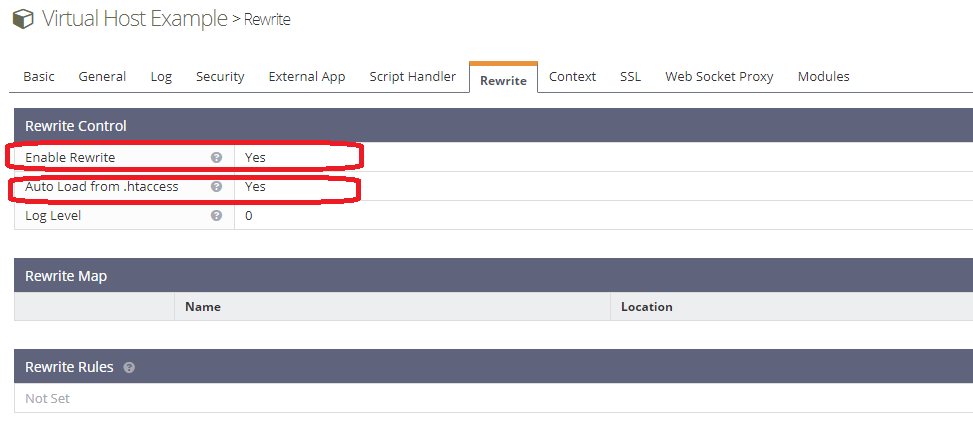
In the OLS WebAdmin Console, navigate to Virtual Hosts > Your VH Name> Rewrite and set Auto Load from .htaccess to Yes. Please also make sure to set Enable Rewrite to Yes.
1. Migrate Apache Rewrite Rules from Document Root .htaccess
Go to OpenLiteSpeed Webadmin > VirtualHost > Edit your vhost > Context tab. After that, create a new static context. The fields that need to be edited are:
URI – put here only /
Location – location of the public directory for your webpage
Accessible – Yes
Enable Rewrite – Yes
Rewrite Rules – Put the rewrite rules here
2. Migrate from Apache Document Root .htaccess to OpenLiteSpeed Vhost Rewrite Tab
Lets say that your document root is /home/user/public_html, and you have an .htaccess file there. In this file you have for example:
RewriteRule ^adminPages/(.*)$ admin-panel/$1 [L]To Migrate that rules and that style of rules you will need to make small change. The new rule will look like this:
RewriteRule ^/?adminPages/(.*)$ admin-panel/$1 [L]Put that rule in OpenLiteSpeed > VirtualHost > Edit your host > Rewrite tab.
As you can see we add /? before adminPage. That way OLS will know what to catch and redirect.
3. Migrate from Apache vhost to OpenLiteSpeed vhost
In a virtual host configuration, the rewrite rule pattern will initially be matched against the part of the URL after the hostname and port, and before the query string (e.g. /app1/index.html). If you copy the rewrite rules for your webpage from the Apache vhost file you do not need to make any changes, as they will work in OpenLiteSpeed.
For example if you have in Apache vhost:
<VirtualHost *>
ServerName www.example.com
RewriteEngine on
RewriteCond %{HTTP_HOST} ^www.example.com
RewriteRule ^/(.*)$ http://example.com/$1 [L,R=301]
</VirtualHost>In OpenLiteSpeed, it will look the same:
RewriteCond %{HTTP_HOST} ^www.example.com
RewriteRule ^/(.*)$ http://example.com/$1 [L,R=301]Put that rule in OpenLiteSpeed > VirtualHost > Edit your host > Rewrite tab.
Rewrite for Subdirectory
The RewriteBase directive is not supported by OpenLiteSpeed and you will need to make minor changes to your rewrite rules. For better understanding we will give you an example:
In an .htaccess file:
RewriteBase /joomla
RewriteRule .* index.php [F]In a virtual host configuration (and in OpenLiteSpeed):
RewriteRule /.* /joomla/index.php [F]Useful Examples
Default WordPress rules:
# BEGIN WordPress
RewriteEngine On
RewriteBase /
RewriteRule ^/index.php$ - [L]
RewriteCond %{REQUEST_FILENAME} !-f
RewriteCond %{REQUEST_FILENAME} !-d
RewriteRule . /index.php [L]
# END WordPressForce https in wordpress
RewriteEngine On
RewriteCond %{HTTPS} !=on
RewriteRule ^/?(.*)$ https://%{HTTP_HOST}%{REQUEST_URI} [L,R=301,NE]
Redirect to HTTPS:
RewriteCond %{SERVER_PORT} 80
RewriteRule ^(.*)$ https://www.your-domain.com/$1 [R,L]Redirect www to HTTPS:
RewriteCond %{HTTP_HOST} ^www\.your-domain\.com
RewriteRule (.*) https://your-domain.com/$1 [R=301,L]Drupal 8:
RewriteCond %{REQUEST_FILENAME} !-f
RewriteCond %{REQUEST_FILENAME} !-d
RewriteCond %{REQUEST_URI} !=/favicon.ico
RewriteRule ^/ index.php [L]Laravel:
RewriteRule . /laravel/public/index.php [L]
RewriteCond %{REQUEST_FILENAME} !-d
RewriteCond %{REQUEST_FILENAME} !-fCodeIgniter:
RewriteCond %{REQUEST_FILENAME} !-f
RewriteCond %{REQUEST_FILENAME} !-d
RewriteRule ^/(.*)$ index.php?/$1 [L]

Comments
Post a Comment